
The Common Elements of an IT Workbench

IT teams do some of their best work when the workspace supports the task at hand. Whether technicians are staging computers, repairing equipment or managing hardware in a lab, a properly designed IT workbench can make the work safer, more comfortable and more efficient.
Unlike a standard office desk, an IT workbench is specialized furniture built from heavy-duty materials. It provides a stable work surface while supporting the equipment, tools, power connections and accessories required in technology-intensive environments. Sustema builds its workbenches with a steel frame and typically uses scratch-resistant high-pressure laminate, or HPL, for the work surface.
What Are IT Workbenches Used For?
IT workbenches are used wherever people need to install, test, maintain or repair technology. Common applications include computer staging areas, production units, IT troubleshooting departments, repair centres, engineering workstations and forensic laboratories. They can also be customized to provide equipment storage in data centres.
Because every technical environment operates differently, these workbenches are rarely one-size-fits-all. A station may be wall-mounted or freestanding. It can serve one technician or form part of a larger workspace with several users.
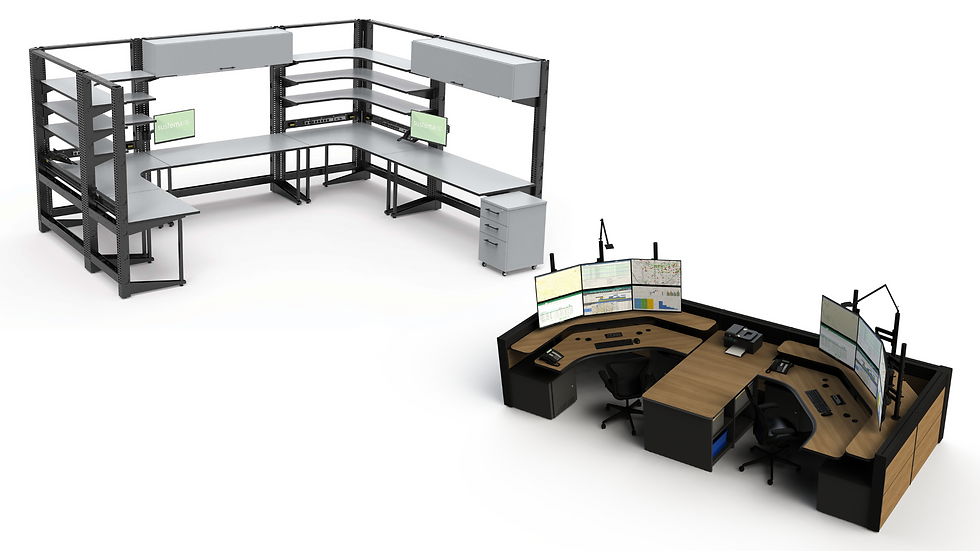
Modular systems make it possible to arrange workbenches side by side, back to back, in a U-shaped layout or as a laboratory island. This flexibility also allows organizations to expand or reorganize their work areas as their teams and technology requirements change.
The Most Common Elements of an IT Workbench
Although each workbench should reflect its intended application, several elements appear in most successful designs.
A Strong Frame and Durable Work Surface
The work surface is where most daily tasks take place, so it needs to withstand equipment, tools and repeated use. A steel substructure provides the support required for heavier components, while an HPL surface offers resistance to scratches. Depending on the environment, workbenches can also include ESD surfaces to help meet the needs of electronics-focused work.
Adjustable Working Heights
Technicians may alternate between detailed hardware repairs and longer software updates. Height-adjustable work surfaces allow them to work while sitting or standing and accommodate users of different heights.
Shelves and work surfaces can also be installed at different positions along the workbench’s vertical structure. This helps place frequently used equipment within comfortable reach.
Power, Data and Cable Management
Computers, monitors, testing equipment and other devices all require reliable access to power and network connections. Common workbench elements include power bars, data ports and electrical raceways integrated into the steel structure.
Strategically positioned outlets and network jacks make connections easier to access. They also help keep cables organized instead of allowing them to spread across the work surface. Sustema recommends planning for twice as many power and network outlets as initially expected, giving the workstation room to support future equipment.
Equipment and Monitor Supports
Monitor arms, CPU holders, keyboard trays and laptop drawers can free up valuable workspace while keeping technology accessible. Adjustable monitor supports are particularly useful when a station needs to accommodate multiple screens or different users.
Shelving and Storage
Shelves, drawers and cabinets help technicians organize tools, components and supplies. Available options include wire mesh shelves, heavy-duty shelves, bin panels, mobile pedestals, filing cabinets and storage bins. The right combination depends on the size and weight of the equipment being stored and how often it needs to be accessed.
Task-Specific Accessories
Accessories can make a technical station more productive without taking up additional floor space. Frequently used options include lamps, telephone supports, whiteboards, tackboards, office-supply shelves and holders for pens and pencils. Slat walls and other mounting systems make these accessories easier to add, remove or reposition as requirements evolve.

Build an IT Workbench Around Your Team
A well-designed IT workbench brings the work surface, equipment, storage, connectivity and accessories together in one organized system. More importantly, it can be configured around the technicians who will use it and the tasks they perform every day.
Planning a new IT workspace, computer repair area or technical laboratory? Ask Sustema for a quote for your next IT workbench project and start designing a workstation that fits your equipment, space and operational needs.


Comments