
How Dispatch Console Furniture Boosts SOC Efficiency, Ergonomics, and Team Collaboration

Updated: 4 hours ago
A Security Operations Center can have the best cameras, access control tools, alarms, and analytics on the market, yet still lose time because the physical workspace does not support the work. Operators sit for long shifts, monitor multiple sources, respond to changing priorities, and coordinate with teams under pressure. The furniture around them shapes how well they can do that.
Dispatch console furniture is more than a place to hold screens. In a well-designed SOC, consoles help reduce fatigue, organize technology, improve sightlines, and make collaboration easier during critical events. The result is a room that supports sharper decisions and faster response.

Ergonomic design helps operators stay alert longer
SOC work is physically and mentally demanding. Operators often sit for extended periods while reviewing video feeds, alarm data, maps, incident queues, and radio or chat communications. Poor posture, awkward monitor height, and cluttered surfaces can wear people down long before a shift ends.
A well-built console gives operators control over their working position. That may include:
Sit-stand height adjustment for shift variation and comfort
Monitor arms that place screens at proper eye level
Curved work surfaces that keep key tools within easy reach
Task lighting that reduces eye strain without creating glare
Footrests, wrist support, and adjustable accessories for long shifts
Ergonomics directly affects efficiency. When operators do not need to fight the workspace, they can focus on the event in front of them. A small design issue, such as a screen placed too high or a radio mounted out of reach, can slow response when seconds matter.
This is especially true in 24/7 centers. In public safety dispatch environments, for example, agencies often move from standard workstations to purpose-built consoles after recognizing that long call-taking shifts require stronger ergonomic support. The same principle applies to SOCs that monitor campuses, hospitals, airports, utilities, and enterprise facilities.
Cable management reduces clutter and downtime
Technology density is one of the biggest differences between a standard workspace and a SOC console. A single operator position may support several monitors, keyboards, radios, power supplies, KVM switches, network connections, charging docks, and control panels.
Without proper cable management, that setup becomes hard to maintain. Loose cables create visual clutter, make cleaning difficult, and increase the risk of accidental disconnection. They also slow down technicians who need to troubleshoot or replace equipment.
Specialized consoles solve this with built-in pathways and access points. Common features include:
Rear cable raceways
Removable access panels
Separated power and data routing
Ventilated equipment compartments
Labeled connection points
Service access that does not disrupt the operator

Casino surveillance rooms offer a clear real-world example. These environments depend on continuous camera coverage and quick review of many video feeds. When surveillance teams upgrade from improvised work surfaces to consoles with managed cabling and monitor support, the room becomes easier to service and less prone to cable-related interruptions. The operational gain is not flashy, but it matters every day.
Modularity supports changing missions and growing teams
SOCs rarely stay the same for long. New cameras are added. Access control systems change. Cyber and physical security teams may begin sharing a room. A facility may need more operator positions during major events, storms, or high-risk periods.
Modular console systems help the room adapt without a full rebuild. Instead of treating furniture as fixed infrastructure, modular designs allow teams to add, remove, or reconfigure positions as needs change.
Useful modular features include:
Reconfigurable console sections
Add-on monitor supports
Swappable work surface components
Adjustable equipment bays
Scalable layouts for small and large SOCs
This flexibility supports both daily operations and emergency response. A regional utility SOC, for instance, may use a normal staffing model during routine monitoring but bring in additional operators during severe weather. Modular furniture can support temporary team expansion while keeping sightlines, communication paths, and equipment access intact.
The same pattern appears in university and healthcare security centers. As campuses add buildings, cameras, visitor management systems, and emergency notification tools, modular consoles give the SOC room to grow without creating a patchwork of mismatched stations.
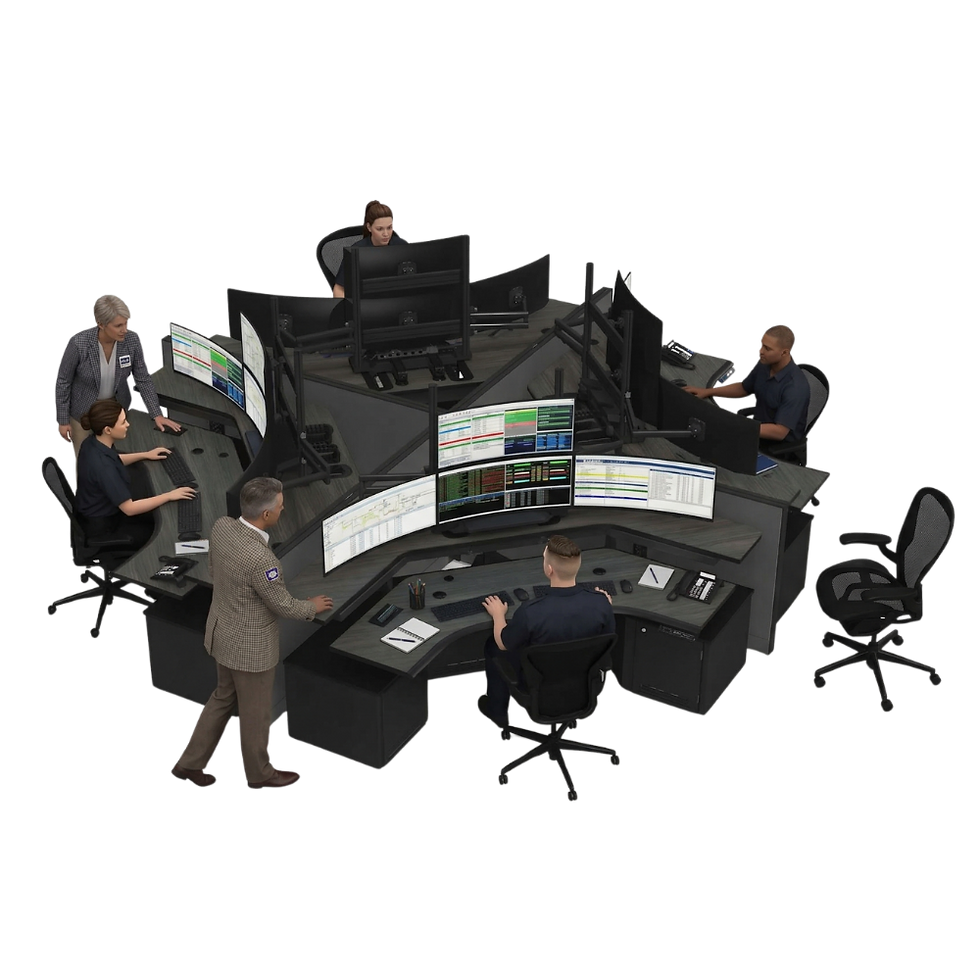
Integrated technology turns the console into part of the system
Modern SOC furniture often includes technology support built into the console itself. This can include power modules, USB charging, monitor mounting systems, radio mounts, speaker integration, environmental controls, and equipment ventilation.
The goal is simple. Operators should have the tools they need in the right place, without crowding the work surface or blocking views.
Integrated technology also improves consistency across the room. When every position has the same monitor arrangement, controls, lighting, and cable access, operators can move between stations with less adjustment. Supervisors also gain a cleaner view of team activity and screen status.
Airport security operations show why this matters. These centers often watch video, alarms, access control, intercoms, and incident reports at the same time. A console that supports side-by-side systems, shared displays, and fast communication can help operators move from detection to coordination more smoothly. The furniture does not replace the technology, but it helps the technology work as intended.
Better furniture improves collaboration during incidents
A SOC is not just a row of individuals at screens. During an incident, operators need to share information quickly, confirm details, coordinate roles, and keep supervisors informed. Furniture layout plays a major role in that process.
Console shape, spacing, and screen placement can either support teamwork or create barriers. Curved or pod-style layouts make it easier for operators to communicate without leaving their stations. Supervisor consoles placed with clear visibility can help leaders assess workload and step in when needed. Shared wall displays give everyone a common operating picture.
The best SOC layouts reduce unnecessary movement and help teams communicate without breaking focus.
Specialized furniture can also separate quiet monitoring areas from active response positions. That helps reduce noise and distraction during routine work while still allowing the room to shift into a coordinated response mode when needed.

The workspace becomes a security tool
The physical design of a SOC affects how quickly teams notice, interpret, and respond to events. Ergonomic consoles help operators stay comfortable and alert. Cable management keeps technology organized and serviceable. Modular layouts support future changes. Integrated technology keeps critical tools close at hand. Better sightlines and smarter room layouts improve team coordination.
For security leaders planning a new SOC or upgrading an existing one, furniture should be part of the operational strategy from the start. The right consoles do not simply make the room look more professional. They help people work with less friction, make decisions faster, and respond with greater confidence when the situation demands it.


Comments